You can permanently delete your Reddit account from the website or the official mobile app. That action removes the account record and your ability to log in with that username and email. It does not, however, scrub your posts, comments, or private messages. Those usually remain unless you delete them first. You’ll need the account password to complete deletion; if you’ve lost access to the registered email or password, recovery through Reddit Support is possible but far from guaranteed. If your goal is to both close the account and pull down sensitive content, do some prep: export your data, prune old posts and comments, cancel any subscriptions, and revoke third-party app access before you press Delete.
Key Takeaways
- Deleting the account removes the login and email association but does not generally remove posts, comments, or messages.
- You need the account password. If you lost the registered email, account recovery is often difficult.
- Export your data, delete or redact sensitive content, cancel subscriptions, and revoke OAuth apps before deleting.
- For large histories, consider a carefully vetted script or tool. Manual deletion is safest for sensitive items.
How Reddit account deletion works
Deleting a Reddit account removes the user record and the connection to your email. Your username stops working for login and your profile page becomes inaccessible. But your contributions usually live on. Reddit will show them as authored by [deleted] or sometimes leave the username text visible without a live profile behind it. Which display you see can depend on timing and Reddit’s current handling of that content.
A common misconception: deleting an account doesn’t delete everything you’ve said. It’s not a magic eraser. If you posted personal details in a comment thread about, say, a medical issue in r/AskDocs or attached your full name to a local meetup post in r/Seattle, delete those items first. You can also follow up with moderators and privacy requests where appropriate.
How to delete Reddit account on desktop web
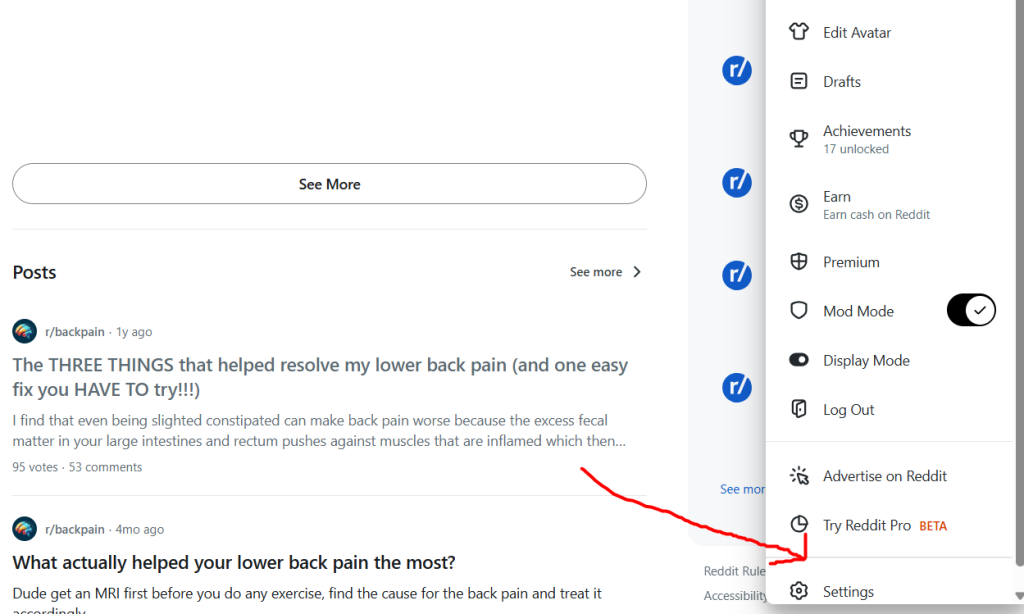
On the desktop site, account deletion lives in User Settings. Make sure you’re signed into the exact account you intend to remove. If you juggle multiple accounts, pause and double-check the username in the corner before you proceed. I’ve seen seasoned moderators slip up here after a long day of switching alts.
Desktop deletion, step by step
- Sign in at reddit.com with the account you want to remove.
- Click your avatar (top right) and choose User Settings.
- Scroll to the bottom of the Account tab and find Delete Account.
- Click Delete Account, enter the username and password, and optionally add a reason.
- Confirm the deletion. The site warns that this is permanent.
If you’re active on several devices, consider logging out everywhere else first. Deletion will still work if you stay signed in elsewhere, but it’s surprisingly easy to confuse which account you just removed. A private/incognito window for the final step keeps things clean.
Watch for interface quirks
Depending on the layout, the “permanent” warning can be easy to skim past. Before you hit confirm, glance at the username displayed in Settings and the email tied to that account. I’ve watched people delete a throwaway alt by accident when they meant to remove their main—or the other way around—because they didn’t check both fields.
How to delete Reddit account on iOS and Android
The official apps do support deletion, though sometimes they hand you off to a web view to finish the job. If the option seems buried or missing, open a mobile browser and follow the desktop flow. Saves you the hunt.
Mobile steps
- Open the Reddit app and tap your avatar.
- Tap Settings (gear icon), then Account settings for that account.
- Find Delete Account. If you don’t see it, tap Open in browser or Manage account on web.
- Enter your credentials and confirm deletion while on a stable, secure network.
Spotty Wi‑Fi or switching from cellular mid-confirmation can trigger errors. If the app gives you a vague failure message, don’t assume it worked—sign back in to confirm the status.
Recovering access if you lost password or email
If you remember the account email but forgot the password, use Reddit’s password reset and you’re back in business. If you no longer control the email, recovery becomes an uphill climb. Reddit Support may be able to help with strong proof, but manage your expectations.
Password reset flow
- Go to reddit.com/login and click Forgot password.
- Enter the email connected to the account and follow the reset link sent to that address.
Pro tip: don’t spam the reset button. Multiple requests can rate-limit you, and only the most recent link will work anyway. Wait for it, then click the newest email.
Lost email access
Start by trying to recover the email itself. For example, if it’s a Gmail address, use Google’s account recovery tools; getting that mailbox back often solves Reddit too. If that fails, file a request with Reddit Help and include as much corroborating detail as you can: approximate account creation date, subreddits you moderated, links you posted that only you would know. Sometimes this works. Sometimes not.
From Reddit Help: “If you lost access to your email, we may not be able to verify account ownership in all cases. You can try contacting us from a current email address and provide as much proof as possible.”
What happens to posts, comments, and messages after deletion
Account deletion removes the user record, not your contributions. Posts and comments generally remain on Reddit, detached from an active profile. Private messages remain in recipients’ inboxes. Deleting your account won’t reach into someone else’s mailbox and pull your messages back.
Posts and comments
Most posts and comments will still be visible. You’ll see the author as [deleted] or your old username without a live profile link. Moderators can remove content, and Reddit staff can act on policy violations, but don’t expect your history to vanish just because the account is gone.
Private messages and chat
If you need messages removed, you’ll have to ask recipients to delete their copies, or involve moderators/admins if rules were broken. Hard truth: once someone else has a copy, control is limited.
Removing posts and comments before deleting
If you want your footprint minimized, clean up before you delete the account. For a small history, this is straightforward. For a decade of comments? Different story. Scripts and third-party tools can help, but choose carefully.
Manual cleanup
- Open each post or comment and choose Delete.
- If a post embeds an image hosted elsewhere (e.g., Imgur with your license plate visible), remove the source image too.
People often forget comments. A throwaway remark in a 2016 r/legaladvice thread can reveal more about you than any post on your profile. Don’t leave those behind.
Mass-deletion tools and scripts
There are browser extensions, third-party sites, and API scripts that bulk-delete. Some use OAuth instead of asking for your password—which is better—but you still need to vet them. Personally, I recommend manual deletion up to a few hundred items. Beyond that, use a script you control or a respected open-source tool, and respect Reddit’s API rate limits to avoid getting throttled mid-cleanup.
Exporting your Reddit data
Want a local archive? Request a copy of your Reddit data from User Settings or via a GDPR/CCPA privacy request. Exports can include posts, comments, and some account metadata. Ask for it before deleting your account if you’ll ever want it later.
How to request your data
- Go to User Settings and open Privacy & Data.
- Request a copy of your data. Reddit will email you when it’s ready to download.
Exports can take hours for small accounts and several days for prolific ones. Don’t delete your account until the export arrives if you need that archive. After deletion, getting the same export can be more complicated.
Canceling Reddit Premium and unlinking apps
Cancel active subscriptions first so you’re not paying after the account is gone. Then revoke third-party app access and remove any API keys tied to your username. Some subscriptions run through Apple or Google, not Reddit, so check those too.
How to cancel Premium
- If purchased via reddit.com: cancel in User Settings under Subscriptions.
- If purchased via iOS or Android: cancel through your App Store or Google Play subscriptions.
Revoke third-party app access
Under User Settings, open Apps or Authorized Applications and revoke access. Keep in mind: third-party services may retain copies of your data even after you revoke. If you need those removed, contact the service directly.
Troubleshooting common errors when trying to delete an account
If deletion fails, the usual culprits are simple: wrong password, two-factor authentication getting in the way, cached app data acting up, or a temporary Reddit outage. Try the basics before opening a ticket.
Common problems and fixes
- Incorrect password: reset it via the registered email.
- Delete button missing in the app: use a browser and follow the desktop steps.
- Two-factor problems: if you don’t have 2FA codes, disable 2FA using backup codes or your recovery method first.
- Rate limits or server errors: wait an hour, try a different network, or use a private/incognito window to avoid extension interference.
Quick fix that helps more than it should: incognito window, fresh login, no extensions. Clean slate.
Deleting multiple accounts and best practices
Handle each account separately and methodically. Keep a short list of usernames and emails so you don’t nuke the wrong one. If an account holds moderator roles or other responsibilities, transfer those before deletion. I can’t stress that last bit enough.
Bulk management checklist
- List each account and its associated email.
- Cancel subscriptions and transfer any moderator roles you control.
- Delete or redact sensitive content from every account.
- Sign into each account and perform the deletion process for that account.
I’ve seen communities get orphaned because the only active mod deleted their account without a handoff. Cleaning up that mess takes weeks. Don’t be that story.
Timing, reversibility, and account recreation
Deletion is permanent for practical purposes. There’s no undo button. You might be able to recreate a new account with the same username only if it becomes available—which is unpredictable and often doesn’t happen quickly, if at all.
Short answers
- Can you recover a deleted account? Not usually; deletion is treated as permanent.
- How long until deletion completes? The account record is removed immediately, but caches and third-party sites can lag.
Expect remnants to linger. Plan around that if you’re dealing with time-sensitive privacy issues.
Privacy implications and removing personal data
Account deletion is not the same as data removal. If you shared personal information, delete or redact those posts first, work with subreddit moderators, and consider legal routes (GDPR/CCPA). Search engines may keep cached pages even after Reddit content is removed, so you may need to request de-indexing.
How to pursue removals
- Ask subreddit moderators to remove content that breaks rules or contains personal data.
- Submit a privacy request to Reddit through Privacy & Data for GDPR/CCPA issues.
- Request removal of cached pages from search engines once the original content is gone.
In practice, full removal is a process, not a button. I’ve helped sources scrub phone numbers from doxxing threads—one week for moderator removals, another for Reddit’s privacy team, and a couple more for search engines to drop caches.
Checklist before you delete
A little prep saves a lot of regret. Give yourself a day, not an hour.
- Export your Reddit data and save a local copy.
- Cancel Premium and check App Store/Google Play subscriptions.
- Revoke third-party app access and save any API keys you still need.
- Delete or redact sensitive posts and comments.
- Transfer moderator roles and subreddit responsibilities.
- Take screenshots of critical messages or confirmations you might need later.
- Confirm you can access the registered email or have recovered it first.
Surprisingly common oversight: private messages with API tokens or invite links. Once the account is gone, those often are too.
Whether you’re a casual user or rely on Reddit marketing to reach your audience, remember that deleting your account is permanent. If your goal is simply to improve your presence, refining your Reddit strategy and following subreddit guidelines may be more beneficial than removing the account altogether.
Case studies
Case study 1. A privacy‑conscious journalist
Scenario. A freelance journalist wanted to retire a decade‑old account with comments that could tie sources to specific investigative threads. They exported data, deleted comments naming venues and dates, asked moderators in r/technology and r/worldnews to pull a couple of borderline posts, requested a GDPR export, then deleted the account.
Outcome. Most sensitive items disappeared from Reddit, but a few comments lingered in third‑party archives.
Lesson. A multi‑step approach beats a single click, but expect some residuals beyond Reddit.
Case study 2. A moderator with multiple alts
Scenario. A mod in r/hometheater had several alts used for testing automoderator rules. They reassigned mod roles, exported mod logs, announced the changes to the team, and deleted the obsolete accounts one by one.
Outcome. No lost permissions, no orphaned sub, minimal broken links.
Lesson. Inventory roles and document ownership before you delete anything.
Here are two comparison tables to help you decide how to proceed.
| Option | What it removes | Pros | Cons |
|---|---|---|---|
| Delete account | Account record and login | Permanent removal of account identity | Posts and comments often remain |
| Manual delete content | Specific posts and comments | More control over what stays | Time consuming for large histories |
| Use third-party mass-delete | Bulk deletion of posts/comments | Fast for large volumes | Security and TOS risks |
And another table comparing deletion methods.
| Method | Speed | Risk | Recommended when |
|---|---|---|---|
| Manual deletion | Slow | Low | Under 500 items or sensitive content |
| Script/API | Fast | Medium to high | Thousands of items and you control the script |
| Third-party service | Fast | High | Only after validating trustworthiness |
Frequently asked questions
- Can I recover a deleted Reddit account?
No. Deleted Reddit accounts cannot generally be recovered. Once you confirm deletion, Reddit treats the account as permanently removed. If you deleted by mistake, recovery is rare. - Will my posts disappear if I delete my Reddit account?
No. Deleting the account does not automatically remove posts and comments. They usually remain visible but are disassociated from an active profile. Delete content manually or ask moderators to remove it before deleting the account. - How do I delete a Reddit account without access to the email?
You may not be able to delete without the registered email. Try recovering the email, or contact Reddit Help with proof of ownership such as creation date, moderated communities, or links only the owner would know. This is not guaranteed. - Can someone impersonate me after I delete my account?
Deleting an account removes that username for login, but others can create similar names. For high-risk cases, monitor for copycats and report them. Exact username reuse is unpredictable. - Does deleting Reddit remove it from search engines?
No. Search engines may keep cached versions. Delete the original content on Reddit first, then request cache removal from search engines to speed things up. - Will Reddit keep any of my data after deletion?
Reddit may retain certain records for legal, operational, or backup reasons as described in its privacy policy. Deletion removes the user-visible account, but internal logs and backups can persist. Use a privacy request for GDPR/CCPA routes. - How long does a Reddit data export take?
It varies. Small accounts might get exports within hours; large ones can take days. Request the export before deleting your account if you’ll need it. - Are third-party deletion tools safe?
Not always. They can be convenient but may ask for credentials or OAuth access. Vet tools carefully, check reviews or source code, and revoke access afterward.
Final notes
Technically, deleting a Reddit account takes a minute. The real work is everything before that: exporting data, scrubbing sensitive posts and comments, canceling subscriptions, and reining in linked apps. If privacy is the priority, expect a multi-step process that may include moderator requests and search engine cache removals. The single most useful move is preparation—request your export, make a checklist, and only then hit Delete.